
Why Manual Digitizing is Better than AI? The Truth for 2026
June 9, 2026
13 min read
Sassy Digitizing
Expert insights, industry trends, and deep dives into the worlds of professional digitizing and embroidery production and vector art.

4.7/5
Guaranteed File Compatibility & Industry Standards






Upload your artwork and get a machine-ready embroidery file in just 2 to 4 hours. No upfront payment. Pay only after you approve. Free revisions included!
2–4 Hours
Rush Turnaround
100% Approval
Pay After Approval
Free Revisions
Until You're Happy
In the modern embroidery industry, technology is everywhere. Many shop owners are now looking at AI auto-digitizing software that promises speed and low costs. However, there is a major difference between a file made by an algorithm and one created by a master digitizer. One is built for speed. The other is built for production.
If you want your embroidery business to thrive, you must understand the technical side. Manual digitizing remains the gold standard for quality and efficiency. In this guide, we explore exactly why the human touch is still the best choice for your brand in 2026 and beyond.
⚡ Quick Answer
Why is manual digitizing better than AI auto-digitizing?
AI auto-digitizing works by tracing pixels. The software looks at colors in the artwork and places stitches in those areas based on shape recognition. It does not understand the context of the design, the garment it will be stitched onto, the fabric structure, or the machine behavior that will determine the final result.
Manual digitizing is an art form built on technical knowledge. A professional digitizer looks at the fabric type, the garment construction, the output size, and the machine specifications before placing a single stitch. They manually map every stitch to ensure the best needle movement, the correct stitch sequence, and the right density for the specific production conditions.
AI Auto-Digitizing: What It Does
Traces pixel shapes from the artwork and assigns stitch types based on color zones. It applies default density, default underlay, and default sequence without adjusting for fabric behavior, garment construction, or production requirements. The output is a digital imitation of the design, not a production-ready embroidery file.
Manual Digitizing: What It Does
A skilled human operator assigns every stitch type, density value, underlay structure, compensation setting, and thread path based on knowledge of how each decision affects the physical sew-out. The output is built for production: it accounts for fabric pull, needle heat, stitch count per area, and machine travel efficiency.
⚠️ The core problem with AI auto-digitizing: The algorithm processes the artwork. It does not understand the production environment. A file that looks correct in software preview can still fail completely on fabric if the push compensation, density, and underlay are wrong. AI cannot know this until the machine tells it with broken threads and ruined garments.
Every fabric reacts differently to a needle. A soft performance polo stretches far more than a structured cap twill. A fleece garment behaves completely differently from a stable woven canvas. AI software applies one default compensation value regardless of the fabric. It does not know what fabric the file will be stitched on because no one told it.
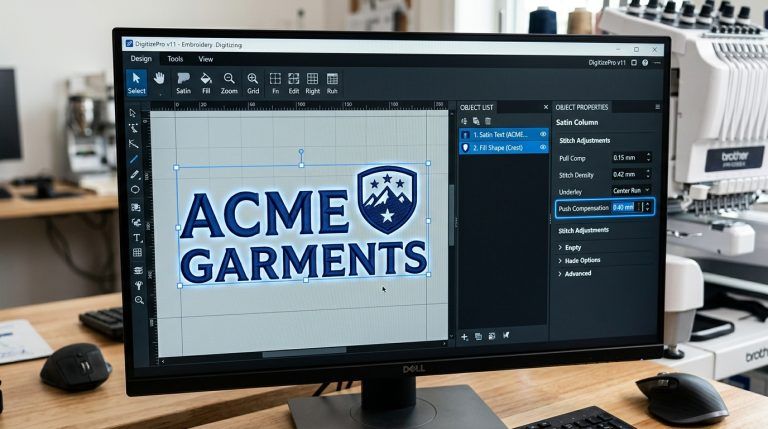
Because of this critical gap, AI designs often look distorted or misaligned once they are stitched. Column widths narrow, borders shift, and circular shapes become slightly oval. A manual digitizer uses push and pull compensation to counteract each fabric's specific movement. They adjust the stitch width and position so that what is designed on screen matches what is stitched on fabric.
| Fabric Type | AI Compensation | Manual Compensation |
|---|---|---|
| Performance polo (stretch) | Default; often 0 or global setting | 1.0mm to 1.2mm; adjusted per element |
| Cotton pique polo | Default; not fabric-specific | 0.4mm to 0.8mm; set per stitch type |
| Structured cap twill | Default; cap geometry not accounted for | Adjusted for cap curvature and seam pull |
| Fleece or terry cloth | Default density causes sinking and gaps | Density opened; topping and underlay adjusted for pile |
✅ Result of correct push and pull compensation: Circles remain round. Borders stay perfectly aligned. Column widths stitch to the designed dimension rather than narrowing under needle pull. The design on the garment matches the artwork every time.
One of the biggest problems with AI auto-digitizing is excessive and poorly distributed stitch counts. The algorithm often layers too many stitches in one area without understanding the consequences on the machine, the thread, or the fabric.
What excessive AI-generated stitch density causes on the production floor:
Machine slowdown: Your machine has to work harder and longer on every garment, reducing output per hour across the entire production run.
Thread breaks: High density creates excessive friction between thread layers and the needle, causing frequent breaks that require operator intervention and restart.
Bird nesting: Too many stitches concentrated in one spot can jam the machine's bobbin mechanism, causing bird nesting on the back of the garment that requires the entire design area to be cut out.
Manual digitizing focuses on efficiency. A professional digitizer creates a logical stitch path: a sequence that moves the machine smoothly from one part of the design to the next without unnecessary jumps, redundant stitch layers, or density buildup in corners and overlapping zones.
Each color zone is completed in one logical pass before the machine moves to the next. Travel stitches are routed within fill areas where possible so they are never visible on the finished garment. The total stitch count is optimized so the design runs clean at maximum machine speed with minimum thread consumption.
💡 Production impact: A manually digitized file with optimized pathing can stitch in 30 to 40% less time than an AI-generated file with the same design because the machine travels less, trims less, and runs at consistent speed rather than stopping constantly for thread breaks and resets.
AI fails most visibly when it comes to small details. If you have a logo with text under 4mm in height, AI will turn it into a messy blob of thread. The algorithm does not understand that small lettering requires different stitch types, different density settings, and different underlay structures than large fill areas.
Professional digitizers use specific manual techniques for small lettering and fine details:
The difference this makes: A manually digitized small lettering element reads clearly on the finished uniform and stays legible after multiple commercial washes. An AI-digitized equivalent often merges into an unreadable mass of thread on the first sew-out.
The same principle applies to sharp corner details, thin outline stitching, complex curved shapes, and any design element where the stitch width approaches the minimum for stable production. These are judgment calls that require experience, not pattern recognition from pixel data.
| Factor | AI Auto-Digitizing | Manual Digitizing |
|---|---|---|
| Push and pull compensation | Default global value; not fabric-specific | Set per element per fabric type |
| Stitch density | Default; often too dense or too open | Calibrated per fabric and stitch type |
| Thread path sequencing | Random; based on layer order in artwork | Logical; sequenced by proximity and color zone |
| Underlay construction | Auto-assigned; often wrong type or skipped | Built per element; matched to fabric and stitch type |
| Small lettering (under 4mm) | Unreadable; stitches merge or fill closed | Readable; technique adjusted for letter size |
| 3D puff embroidery | Cannot handle; no stop placement logic | Full stop sequence for foam placement and trim |
| Thread break rate | High; density errors cause frequent breaks | Near zero; optimized for clean production runs |
| Jump stitches | Frequent; no logical pathing between elements | Minimized; travel paths routed within fill areas |
| QA before delivery | No production review; file exported as-generated | Secondary QA check on density and pull compensation |
| Production time per garment | Longer; thread breaks and machine stops add time | Shorter; optimized pathing runs at full machine speed |
The argument for AI auto-digitizing is usually price. An auto-digitized file costs less upfront. But this calculation ignores what happens on the production floor when that file runs.
| Cost Category | AI File Production Run | Manual File Production Run |
|---|---|---|
| Digitizing file cost | Lower upfront | Slightly higher upfront |
| Thread consumption | Higher; excessive stitch count wastes thread | Optimized; stitch count is production-efficient |
| Thread break downtime | Frequent stops; operator cost per break | Near zero; clean run from start to finish |
| Ruined garments | Possible; bird nesting and density errors damage fabric | Rare; file QA prevents production damage |
| Production time per garment | Longer per unit; more machine time consumed | Shorter per unit; faster throughput |
| Client rejection rate | Higher; quality complaints and rework | Near zero; professional finish on every garment |
| Total cost over 100 garments | Higher overall despite lower file price | Lower overall; savings compound across every run |
The honest calculation: A manually digitized file might cost $10 to $20 more than an auto-digitized equivalent. On a 50-garment production run, one thread break restart costs the operator several minutes. Several thread breaks per garment costs more than the entire digitizing price difference. The math consistently favors manual digitizing when total production cost is calculated honestly.
When you choose a digitizing partner, you need someone who understands these complexities at a production level. Sassy Digitizing is ranked among the Top 10 Best Embroidery Digitizing Companies in the World. Our reputation is built on manual excellence, not software shortcuts.
No shortcuts: every file hand-punched
We do not use auto-digitizing tools at any stage. Every stitch type, density value, underlay structure, and thread path is assigned manually by an experienced digitizer who understands production requirements for the specific design and fabric.
QA on every file before delivery
Every file passes through a secondary quality assurance review that checks stitch density, pull compensation settings, underlay correctness, and machine readiness. No file leaves our studio unchecked.
Full complexity capability
Whether you need a simple left chest logo or a complex jacket back with 3D puff lettering, our quality assurance team ensures the file is machine-ready and production-optimized for the specific garment type. Nothing is too complex for manual precision.
2 to 4 hour turnaround
Manual precision does not have to mean slow delivery. Our expert digitizers are fast and efficient because they build files correctly the first time rather than generating output that requires multiple revision rounds to fix auto-digitizing errors.
AI might seem faster for a few minutes in the ordering process. However, the time you lose on the production floor fixing thread breaks, re-hooping garments, and handling client complaints about distorted designs is far more expensive than the price difference between a manual and an auto-digitized file.
Manual digitizing is better than AI because it respects the craft of embroidery. It protects your machines, satisfies your customers, reduces your production costs over time, and ensures that the design on the garment matches what the client approved. If you are serious about your embroidery business, invest in manual precision. Let the experts handle the technical foundation so you can focus on growing your production volume and client base.
| ✅ | Push and pull compensation set per fabric type; no default global values |
| ✅ | Stitch density calibrated per element; not set to a single default across the design |
| ✅ | Thread pathing optimized by proximity and color zone; no random jump sequencing |
| ✅ | Small lettering and fine detail handled with specific manual technique; not auto-traced from pixels |
| ✅ | Lower total production cost over any run length when thread, time, and garment savings are included |
Experience the difference that manual precision makes on your production floor. No thread breaks, no puckering, no distorted designs. Just clean, production-ready files that run correctly the first time on any machine.
First logo under 5 inches digitized free. Test on your own machines before you commit.
Senior Quality Control (HOD)
As the Head of Quality Control at Sassy Digitizing, Keith brings over 12 years of hands-on commercial embroidery experience to the table. He is our resident problem-solver, specializing in the technical nuances of stitch density, pull compensation, and complex digitizing. When he's not establishing quality standards for 3D puff and appliqué, you'll find him perfecting the art of small lettering to ensure every stitch counts.
Expertise:
Lightning-Fast Delivery
Get your file in 2–4 hours, every time.
Expert Quality
38+ expert digitizers with years of experience.
24/7 Support
We're here to help, anytime you need us.
Secure & Confidential
Your files are safe with us. Always.
Upload your artwork now and let our experts turn it into perfection, fast.
1,794+
Happy Clients
4.7★
Client Rating
38+
Expert Digitizers
6+
Years Experience
© 2026 Sassy Digitizing LLC. All Rights Reserved.

Scale your apparel brand or embroidery shop with the best embroidery digitizing service of 2026. Sassy Digitizing comple…

Stop ruining structured hats with flat sew files. Discover the essential digitizing secrets for curved 3D surfaces inclu…

High embroidery stitch density is the most common reason designs come out stiff, raised and bulky. This guide covers the…