
Best Embroidery Digitizing Settings for Hats and Caps
June 12, 2026
13 min read
Sassy Digitizing
Expert insights, industry trends, and deep dives into the worlds of professional digitizing and embroidery production and vector art.

4.7/5
Guaranteed File Compatibility & Industry Standards






Upload your artwork and get a machine-ready embroidery file in just 2 to 4 hours. No upfront payment. Pay only after you approve. Free revisions included!
2–4 Hours
Rush Turnaround
100% Approval
Pay After Approval
Free Revisions
Until You're Happy
Digitizing for hats and caps is a completely different discipline compared to flat garments like t-shirts or hoodies. The curved surface, the stiff buckram lining, the center seam, and the rotary driver movement all create production challenges that simply do not exist on flat embroidery. Get any one of these settings wrong and you face misaligned outlines, thread breaks, bird nesting, or worse: a needle strike on the metal cap frame.
In 2026, achieving retail-quality headwear embroidery requires a deep understanding of stitch logic and specialized machine settings built specifically for the cap geometry. This guide covers every critical setting your digitizing file must have before it runs on a cap machine.
⚡ Quick Answer
What are the key settings for cap and hat embroidery digitizing?
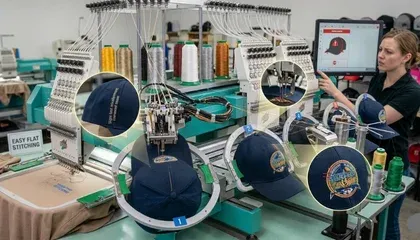
When you embroider a flat garment, the fabric sits in the hoop on a single plane. The needle path, the stitch direction, and the fabric tension are all predictable and consistent. A cap is the opposite of this on every dimension.
| Factor | Flat Garment (T-shirt, Polo) | Cap / Hat |
|---|---|---|
| Stitching surface | Flat and stable | Curved; continuously changing angle |
| Hoop mechanism | Standard flat hoop; fixed position | Rotary cap driver; rotates during stitching |
| Fabric tension | Even across the design area | Uneven; highest at center seam |
| Fabric backing | Soft or woven; needle penetrates cleanly | Stiff buckram lining; acts like a board under the needle |
| Center seam | No seam interference | 6-panel seam runs through the design area; thicker than surrounding fabric |
| Pull direction | Primarily inward (pull compensation handles this) | Multi-directional; both inward and outward as driver rotates |
| Safe design height | Limited only by hoop size | Maximum 2.25 to 2.5 inches before frame risk |
⚠️ A file digitized for a flat shirt will almost always fail on a cap. The pathing sequence, pull compensation requirements, underlay type, and density settings are completely different for headwear. Never run a flat garment file on a cap without re-digitizing it specifically for the cap geometry.
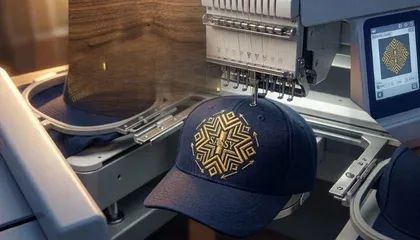
The most critical setting in any cap digitizing file is the stitching sequence. Unlike flat designs that often stitch from top to bottom, caps must always be digitized from the center outward and from the bottom upward. This is non-negotiable and it is the single most common error in cap files produced by auto-digitizing tools or inexperienced digitizers.
Why center-out pathing is essential
Center-out pathing pushes the fabric evenly toward both sides of the hoop as stitching progresses. When the machine starts in the middle and moves outward, the fabric tension distributes symmetrically. If you start at one edge and stitch across to the other, the fabric bunches progressively at the far edge, creating puckering and misalignment that worsens as the design grows.
Why bottom-up pathing is essential
Bottom-up pathing ensures that stitches begin near the bill (the stiffest, most anchored part of the cap structure) and progress toward the crown. Starting near the bill anchors the fabric to the most rigid zone of the cap frame. As the design moves upward, the already-stitched lower area holds the cap in position. Reversing this sequence allows the cap to shift upward during stitching, misaligning the upper elements of the design.
💡 Practical check: Open your cap file in simulation mode and watch the stitch sequence. If the simulation starts at the top or at one side of the design and sweeps across, the file needs resequencing before it runs on a cap driver.

On a curved surface, the underlay layer is the foundation of everything. You cannot rely on a simple center-walk underlay for cap embroidery as you might for a flat garment. The curvature and the stiff buckram require specific underlay types matched to each element type.
| Element Type | Correct Underlay for Caps | Why |
|---|---|---|
| Satin stitch columns (text, borders) | Contour underlay | Locks the column edges and prevents satin stitches from rolling on the curved surface |
| Large fill areas | Zigzag underlay | Provides lift and grid structure; prevents top stitches from sinking into the cap buckram pile |
| Structured caps (buckram-backed) | Avoid heavy fill underlays | Heavy fill underlay makes the design too stiff; causes needle deflection and breaks on the rigid backing |
| Unstructured (soft) caps | Zigzag or double zigzag | Soft caps need more underlay support to prevent stitches sinking into the pliable fabric |
✅ Professional tip: On structured 6-panel caps, avoid heavy fill underlays entirely. The buckram already provides structural support. Adding a heavy underlay on top of buckram compresses the two layers together, makes the design feel like cardboard, and creates the conditions for needle deflection at high speed.
Because caps are under high tension on a rotary driver, the fabric pulls more aggressively than a flat garment at every stage of the stitch sequence. Standard pull compensation values that work on polo shirts and jackets are insufficient for caps. Insufficient pull compensation on a cap produces designs that look narrower than designed, borders that do not close properly, and circles that stitch as ovals.
Recommended pull compensation values for cap embroidery:
| Element / Situation | Recommended Compensation | Notes |
|---|---|---|
| Standard satin columns on structured cap | 0.40mm to 0.45mm | Higher than flat garment standard; cap tension demands more |
| Circles and oval border elements | Over-compensate height by 10 to 15% | Without this, circles pull into ovals on the cap surface |
| Text elements near the center seam | 0.45mm; check per letter | Center seam adds extra pull resistance; compensation may need to increase closer to the seam |
| Fill stitch areas (logos, backgrounds) | 0.35mm to 0.45mm depending on size | Larger fill areas need proportionally higher compensation than small ones |
⚠️ The oval problem: If you digitize a perfectly round circle at standard compensation and sew it on a cap, it will stitch as an oval because the rotary driver pulls the fabric more in the vertical direction than the horizontal. You must over-compensate the height of every circular or oval element in a cap design to account for this directional pull difference.
Caps are usually made of heavy cotton twill or polyester blends over a stiff buckram backing. These fabrics handle density differently than soft garment materials. Getting density and stitch length wrong on a cap produces either thread shredding and fabric holes or sparse, uneven coverage.
| Setting | Recommended Value for Caps | Why |
|---|---|---|
| Satin stitch density | 0.40mm row spacing | Cap twill handles tighter density; produces clean satin coverage |
| Minimum stitch length | 1.5mm absolute minimum | Stitches shorter than 1.5mm act like a drill on the stiff buckram lining; cause thread shredding and holes |
| Fill stitch row spacing | 0.40mm to 0.45mm | Similar to standard flat garment fill; twill can support this without puckering |
| Small lettering (under 6mm height) | Reduce density to 0.45mm; widen columns | Small letters on hard cap backing need column width adjustment to remain readable |
| Needle recommendation | 75/11 or 80/12 sharp point | Sharp needles penetrate buckram cleanly; ballpoint needles deflect and cause breaks on hard lining |
💡 Stitch length warning: The stiff buckram backing in structured caps does not flex to absorb short stitches the way soft fabric does. Every stitch under 1.5mm punches the same holes repeatedly in a rigid material. The result is thread shredding, fabric perforation, and eventual needle breakage. Keep all stitch lengths at 1.5mm or longer throughout the entire cap file.
3D puff embroidery on caps is one of the most technically demanding production processes in commercial embroidery. The raised foam element combined with the curved cap surface and the rotary driver movement creates a unique set of challenges that require completely different settings from flat or standard cap embroidery.
Critical settings for 3D puff on caps:
✅ 3D puff cap embroidery is a task that Sassy Digitizing experts handle daily with 100% accuracy. Every stop is manually placed, every capping density is set for the specific foam thickness and cap fabric, and every file is QA-reviewed before delivery.
The vertical center seam running down the middle of a 6-panel cap is the thickest point on the entire cap structure. When the machine stitches over or near this seam, it encounters a sudden change in fabric thickness and resistance that can push or pull the surrounding fabric away from the needle path.
Why designs shift at the center seam
If pull compensation is too low, the needle encounters the seam resistance and pushes the fabric sideways rather than penetrating straight through. This moves the stitch position laterally from the digitized path and causes the design elements on either side of the seam to appear offset from each other. The alignment error is most visible on designs with continuous border elements or lettering that crosses the seam line.
Design placement to minimize seam problems
Wherever possible, position the design so that no critical element crosses the center seam. For text-based designs, center the text symmetrically on each side of the seam rather than running a letter directly over it. For round or circular elements, the center of the circle should sit on the seam so the seam bisects the design symmetrically rather than cutting through a critical detail.
Seam clearance setting in software
Professional digitizing software including Wilcom includes a seam clearance setting for cap files that adjusts the stitch density automatically in the zone around the seam position. This reduces needle strike frequency at the thickest point of the cap and prevents the fabric push that causes alignment drift. Always enable seam clearance settings when building a cap file in any software that offers it.
Cap embroidery has hard physical limits that flat garment embroidery does not. Exceeding these limits does not just produce poor-quality results. It can cause serious machine damage.
| Dimension Limit | Standard Cap | Consequence of Exceeding |
|---|---|---|
| Maximum design height | 2.25 to 2.5 inches | Needle strikes the metal cap driver frame; broken needle, bent presser foot, machine damage |
| Maximum design width | 4.5 to 5 inches | Design elements approach the cap sidewall seams; puckering and misalignment at the outer edges |
| Minimum stitch length | 1.5mm | Thread shredding, fabric perforation, needle breakage on buckram lining |
| Minimum text height | 4mm to 6mm recommended | Text below 4mm becomes unreadable on cap twill; characters fill and merge |
| ✅ | Stitch sequence: Center-out and bottom-up pathing confirmed in simulation before export |
| ✅ | Underlay: Contour underlay on satin elements; zigzag on fill areas; no heavy fill underlay on structured caps |
| ✅ | Pull compensation: 0.40mm to 0.45mm minimum; circles and ovals over-compensated by 10 to 15% in height |
| ✅ | Density: 0.40mm satin; minimum stitch length 1.5mm throughout the entire file |
| ✅ | Design height: Maximum 2.25 to 2.5 inches; confirm before exporting to prevent frame contact |
| ✅ | Needle: 75/11 or 80/12 sharp point; no ballpoint needles on buckram-backed caps |
| ✅ | Test sew-out: Always test on the actual production cap before approving the file for the full batch |
Sassy Digitizing builds every cap file manually with center-out pathing, seam clearance settings, fabric-specific pull compensation, and full QA review. Whether it is a simple corporate logo or complex 3D puff lettering, our files run cleanly on your cap driver from the first stitch.
First logo under 5 inches digitized free. Test on your own cap driver before you commit.
Senior Quality Control (HOD)
As the Head of Quality Control at Sassy Digitizing, Keith brings over 12 years of hands-on commercial embroidery experience to the table. He is our resident problem-solver, specializing in the technical nuances of stitch density, pull compensation, and complex digitizing. When he's not establishing quality standards for 3D puff and appliqué, you'll find him perfecting the art of small lettering to ensure every stitch counts.
Expertise:
Lightning-Fast Delivery
Get your file in 2–4 hours, every time.
Expert Quality
38+ expert digitizers with years of experience.
24/7 Support
We're here to help, anytime you need us.
Secure & Confidential
Your files are safe with us. Always.
Upload your artwork now and let our experts turn it into perfection, fast.
1,794+
Happy Clients
4.7★
Client Rating
38+
Expert Digitizers
6+
Years Experience
© 2026 Sassy Digitizing LLC. All Rights Reserved.

Scale your apparel brand or embroidery shop with the best embroidery digitizing service of 2026. Sassy Digitizing comple…

High embroidery stitch density is the most common reason designs come out stiff, raised and bulky. This guide covers the…

Stop letting poor software automation damage your brand's reputation. Discover the hidden costs of AI auto-digitizing, f…