




🧵 1 to 2 hours rush Digitizing Available | No Extra Charge | Serving USA, Canada & UK | Call: +1 716 309 2066 • Call: +1 815 664 3282
Sassy Digitizing LLC – Professional Embroidery Digitizing Service
Sassy Digitizing LLC
  • Home
  • Embroidery Digitizing
    View all →
    • Cap Digitizing
    • 3D Puff Digitizing
    • Left Chest Digitizing
    • Jacket Back Digitizing
    • Small Letter Digitizing
    • Applique Digitizing
    • PNG to PES
    • Convert Logo to Embroidery
    Vector Art
    View all →
    • DTF / DTG Vector Art
    • Image Vectorization Service
    • Laser Engraving Vector Files
    • Logo / Flyer / Poster Vector Design
    • Screen Printing / Sublimation Vector Art
    • Vinyl Cutting Vector Files
  • Portfolio
  • Pricing
  • FreeBie
  • Free Design Test
  • About UsQuality GuaranteeManual vs AI DigitizingBlog
  • Contact
Client Login
Home/Blog/Digitizing/How to Convert PNG to DST for Embroidery: The Complete Guide

How to Convert PNG to DST for Embroidery: The Complete Guide

Expert insights, industry trends, and deep dives into the worlds of professional digitizing and embroidery production and vector art.

Contact Us
★Trustpilot
Sassy Digitizing rated 4.7 out of 5 stars on Trustpilot by verified embroidery clients

4.7/5

Guaranteed File Compatibility & Industry Standards

Tajima
Adobe Illustrator
Brother
CorelDRAW
Melco
Wilcom
Back to Blog
Digitizing
How to Convert PNG to DST for Embroidery: The Complete Guide

How to Convert PNG to DST for Embroidery: The Complete Guide

July 1, 2026
3 min read
Sassy Digitizing
#Best Embroidery Digitizing company

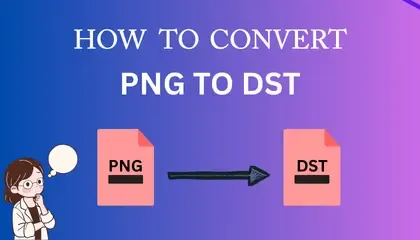
How to Convert PNG to DST for Embroidery: A Step-by-Step Guide
home-remodelin-and-recent-projects-420-x-240-px.webp

If you are new to the world of custom apparel, you might be wondering why you can’t simply open your company logo in Photoshop or Paint and “Save As” a DST file. It is the most common question we answer at Sassy Digitizing.

The short answer is: An image is made of pixels, but a DST file is made of instructions.

In this guide, we will break down exactly how to bridge that gap and convert your PNG images into stitch-ready files for your embroidery machine.
 

What is a DST Files?

A DST file is a specific format originally created by Tajima (but used by almost all commercial machines) that tells the machine three specific things:

  • Coordinates: X and Y movements (Where to move the needle).
  • Trims: When to cut the thread.
  • Stops: When to pause for a color change.

A PNG file, on the other hand, is just a flat grid of colored dots. Your machine doesn’t know how to turn those dots into stitches without specific digitizing instructions.
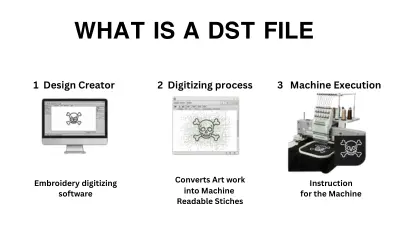
 

What is a DST File

Can I use a Free Online Converter ?

You will find many websites claiming to “Convert PNG to DST Online for Free.” Be careful. These tools use “Auto-Digitizing.” While they can produce a file that the machine can read, the results are often messy, leading to thread breaks and puckering on the final fabric.

How the Professional Conversion Process Works

To get a clean result, you (or a professional digitizer) must “trace” the artwork using specialized software.

  1. Import the PNG: Load your image into software like Wilcom, Hatch, or Pulse.
  2. Define Stitch Types: Assign Satin stitches for borders and Tatami fills for large areas.
  3. Set the Pathing: Tell the machine where to start and stop to avoid messy jump stitches.
  4. Export as DST: Once the pathing is set, you save the file as a DST.

Converting PNG to DST isn’t just a file format change it’s an art form. If you want instant results, you can try auto-software. But if you need a file that won’t break needles, utilizing a professional service is your best friend.

About the Author Keith Blair | Senior Quality Control (HOD) Keith Blair serves as the Head of Department for Quality Control at Sassy Digitizing, bringing 12 years of commercial embroidery experience to the team. His role focuses on the technical mechanics of digitizing, specifically adjusting stitch densities and lengths to suit different fabric types.

A specialist in advanced production methods, Keith oversees the digitizing standards for complex 3D puff, appliqué, and small lettering projects. He ensures that every file is tested for efficiency and run-ability before it reaches the customer, bridging the gap between digital design and physical production.

K

Keith Blair

Senior Quality Control (HOD)

As the Head of Quality Control at Sassy Digitizing, Keith brings over 12 years of hands-on commercial embroidery experience to the table. He is our resident problem-solver, specializing in the technical nuances of stitch density, pull compensation, and complex digitizing. When he's not establishing quality standards for 3D puff and appliqué, you'll find him perfecting the art of small lettering to ensure every stitch counts.

Expertise:

3D puffappliquésmall letteringstitch densitypull compensation

Related Articles

Best Embroidery Digitizing Settings for Hats and Caps
Digitizing
Jul 1, 2026
4 min read

Best Embroidery Digitizing Settings for Hats and Caps

Digitizing for hats and caps is a completely different ballgame compared to flat garments like T-shirts or hoodies. The …
#100 percent Manual Digitizing
Read More
How to Convert a Logo to Ricoma Embroidery Machine Format
Digitizing
Jul 1, 2026
5 min read

How to Convert a Logo to Ricoma Embroidery Machine Format

Ricoma embroidery machines are industrial workhorses. Whether you own a single-head MT-1501 or a multi-head powerhouse, …
#100 percent Manual Digitizing
Read More
AI vs Manual Embroidery Digitizing: Why Automated Software Fails.
Digitizing
Jul 1, 2026
6 min read

AI vs Manual Embroidery Digitizing: Why Automated Software Fails.

Every week, a new embroiderer falls into the same trap. They upload a beautiful client logo into an AI auto-digitizing t…

#100 percent Manual Digitizing
Read More
FAST. RELIABLE. PROFESSIONAL.

Your Design,
Our Expertise.
Delivered in 2–4 Hours!

Upload your artwork and get a machine-ready embroidery file in just 2 to 4 hours. No upfront payment. Pay only after you approve. Free revisions included!

2–4 Hours

Rush Turnaround

100% Approval

Pay After Approval

Free Revisions

Until You're Happy

Why Choose Us?

Lightning-Fast Delivery

Get your file in 2–4 hours, every time.

Expert Quality

38+ expert digitizers with years of experience.

24/7 Support

We're here to help, anytime you need us.

Secure & Confidential

Your files are safe with us. Always.

Ready to Get Started?

Upload your artwork now and let our experts turn it into perfection, fast.

1,794+

Happy Clients

4.7★

Client Rating

38+

Expert Digitizers

6+

Years Experience

Upload Your Artwork
Sassy Digitizing LLC – Embroidery Digitizing and Vector Art Services

Sassy Digitizing LLC

Manual Embroidery Digitizing & Vector Art Services

Serving USA · Canada · UK

Expert manual embroidery digitizing completely eliminates sloppy automated shortcuts. Customers secure exceptionally fast turnarounds with highly transparent pricing and premium files compatible across every major commercial embroidery machine brand.

Services

  • Cap Digitizing
  • 3D Puff Digitizing
  • Left Chest Digitizing
  • Jacket Back Digitizing
  • Small Letter Digitizing
  • Applique Digitizing
  • PNG to PES
  • Convert Logo to Embroidery
  • DTF / DTG Vector Art
  • Image Vectorization Service
  • Laser Engraving Vector Files
  • Logo / Flyer / Poster Vector Design
  • Screen Printing / Sublimation Vector Art
  • Vinyl Cutting Vector Files

Tools

  • Stitch Calculator
  • Embroidery Price Calculator
  • Vector Price Calculator
  • Embroidery Size Chart
  • File Format Guide

Knowledge

  • What is DST File
  • What is PES File
  • Embroidery File Formats
  • Embroidery Density Guide
  • Stitch Count Guide
  • Thread Break Problems
  • Machine Errors
  • PNG vs Vector
  • Vector vs Raster

Contact

  • +1 716 309 2066
  • +1 815 664 3282
  • info@sassydigitizing.com
  • 30 N Gould St Ste N, Sheridan, WY 82801, USA

Payment Accept

Accepted payment gateway methods

© 2026 Sassy Digitizing LLC. All Rights Reserved.

Privacy PolicyTerms & ConditionsRefund PolicyDelivery Policy